Don's boating business — input/output classification, networks, and Don's boating-stock spreadsheet. (20 marks)
(a) Indicate whether each device is recommended to Don's business as input or output: Plotter, Keyboard, Scanner, Printer, Microphone. (5 marks)
Device
Input/Output
Plotter
Output
Keyboard
Input
Scanner
Input
Printer
Output
Microphone
Input
1 mark each = 5 marks.
(b)(i) List THREE types of networks. (3 marks)
WAN (Wide Area Network) — covers a wide geographical area, even spanning countries. The Internet is the largest WAN.
MAN (Metropolitan Area Network) — connects users across a city or large campus.
LAN (Local Area Network) — small geographical area such as a single office or building.
1 mark each. Other accepted: PAN, WLAN, VPN.
(b)(ii) Don would like his network to be wireless. Identify ONE critical hardware component the device needs to access a wireless network, and a reason for it. (2 marks)
Reason: The wireless NIC is what allows devices to connect to wireless networks such as the Internet — it contains the radio transmitter/receiver that sends and receives signals to and from a wireless access point. Without it the device cannot join a Wi-Fi network. (1 mark)
(c)(i) State the formula that would have been used in Cell E2 (Total Value). (2 marks)
=C2*D2
Total Value = Item Cost × No. in Stock — multiply the unit price (column C) by the quantity in stock (column D). For row 2: 400 × 568 = 227 200, matching the value shown.
1 mark for the equals sign + multiplication operator; 1 mark for using cell references C2 and D2.
(c)(ii) State the MOST appropriate cell in which EACH of the following functions could be placed: Average item cost, Grand total. (2 marks)
Average item cost: Cell C8 — directly below the Item Cost column (C2:C7).
Grand total: Cell E8 — directly below the Total Value column (E2:E7).
1 mark each. Both functions belong in row 8 (the row immediately below the data) so they sum / average the column above them.
(c)(iii) Write an appropriate function to calculate the average item cost of the stock. (2 marks)
=AVERAGE(C2:C7)
The Item Cost values sit in column C, rows 2 through 7 (six items). Wrapping the range in AVERAGE(...) returns the mean.
1 mark for the AVERAGE function name; 1 mark for the correct range C2:C7.
(c)(iv) Identify the MOST appropriate formatting style for cells in the columns "Stock ID" and "Total Value". (2 marks)
Stock ID → Text — the values mix letters and digits (e.g., F2012, WD003), so a text/alphanumeric format prevents leading-zero loss and stops the spreadsheet treating them as numbers.
Total Value → Currency — these are monetary amounts, so the currency format gives the appropriate symbol and two decimal places (e.g., $227,200.00).
1 mark each.
(c)(v) State the stock items of the FIRST TWO rows when the spreadsheet is sorted in ascending order, based on the column heading "Item". (2 marks)
Sorting the Item column alphabetically (A → Z): Dinghy, Fender, Jet skis, Jib, Spinnaker, Winch.
First two rows after the sort: Dinghy, then Fender.
1 mark each.
Question 2
Direct-data-entry devices for college tasks; verification & validation; STUDENT and COMPLETION database tables. (20 marks)
(a) Match the appropriate device (Sensor, OCR, MICR, OMR, Light pen) with each use. (4 marks)
Use
Device
Reads codes on a cheque
MICR (Magnetic Ink Character Reader)
Turns on the buzzer when someone approaches the door
Sensor (motion / proximity)
Marks multiple-choice responses
OMR (Optical Mark Recognition)
Digitises handwritten notes for editing
OCR (Optical Character Recognition)
1 mark each = 4 marks.
(b) Indicate whether each task demonstrates verification or validation, and state the method. (6 marks)
Task
Verification / Validation
Method
(i) Prompts the user to enter his/her password twice when creating an online account.
Verification
Double Entry — the system compares the two typed entries and only accepts the password if they match exactly.
(ii) Ensures that the number of hours entered into a payroll system is greater than 0 but less than or equal to 80.
Validation
Range check — the value must fall between 0 and 80 inclusive.
(iii) Ensures that a vehicle reg number is in the form of three letters followed by four digits.
Validation
Format check (also called picture check) — the entry must follow the pattern LLL-NNNN.
1 mark each for verification/validation + 1 mark each for the named method = 6 marks.
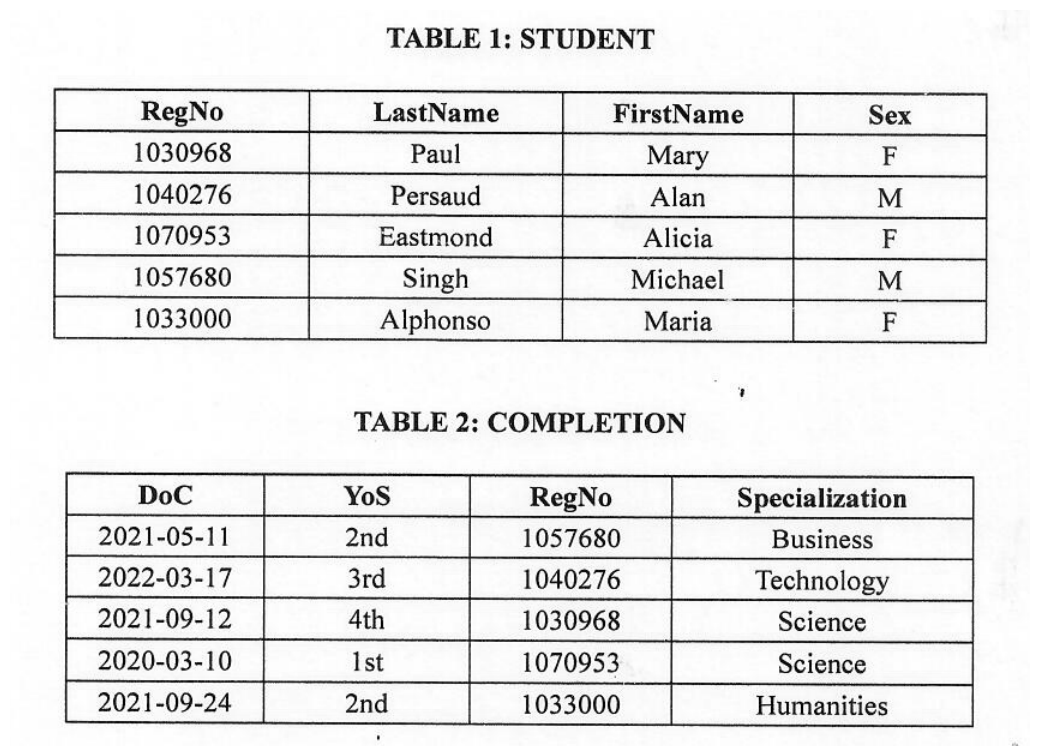
Reference — STUDENT + COMPLETION tables
Reproduced from the original paper — Q2(c) refers to these tables throughout.
(c)(i) State the condition that allows ONE field in the STUDENT table to be declared as a Boolean data type. (1 mark)
The field must contain only two distinct/unique values (e.g., M/F, Yes/No, True/False). In the STUDENT table, the Sex field qualifies — it stores only "M" or "F".
(c)(ii) Identify the field from the STUDENT table that can be used as the primary key, and state the reason. (2 marks)
Primary key: RegNo. (1 mark)
Reason: Each value is unique per row — no two students share the same registration number, so RegNo uniquely identifies every student record. (1 mark)
(c)(iii) State the RegNo of the student who will be SECOND in the sorted list, if the COMPLETION table is sorted in ascending order by the Specialization field. (1 mark)
Specializations in COMPLETION: Business, Humanities, Science, Science, Technology. Sorted ascending alphabetically: Business → Humanities → Science → Science → Technology.
The 2nd row corresponds to Humanities, whose RegNo is 1033000.
(c)(iv) Tables 1 and 2 are linked. State (a) the most appropriate field used to link the tables, and (b) the LastName of the student who completed the online course in the FIRST year. (2 marks)
(a) Linking field: RegNo — appears as the primary key in STUDENT and as a foreign key in COMPLETION. (1 mark)
(b) LastName of student who completed in the 1st year: The COMPLETION row with YoS = 1st has RegNo 1070953. Joining back to STUDENT, that student's LastName is Eastmond. (1 mark)
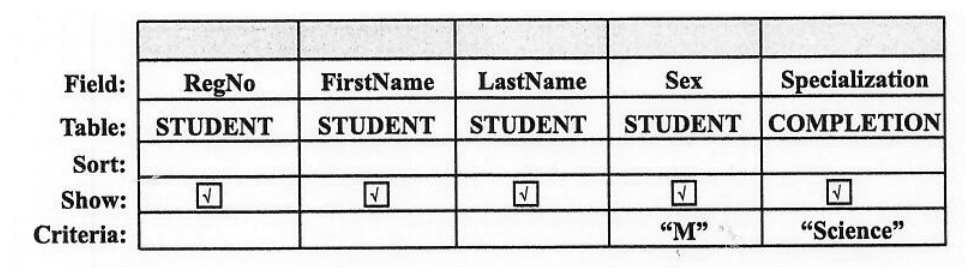
Reference — Query design view (referred to in (c)(v))
(c)(v) The query was performed on the database. Identify (a) the number of fields and (b) the number of records that will be displayed when the query is executed. (2 marks)
(a) Number of fields:5 — RegNo, FirstName, LastName, Sex, Specialization (each column has Show ✓ ticked). (1 mark)
(b) Number of records: The criteria are Sex = "M" AND Specialization = "Science". Looking through the joined data, the male students are Pernaud (Technology) and Singh (Business) — neither has Specialization Science. So 0 records match the combined criteria. (1 mark)
(c)(vi) A report was created from the linked tables. State TWO fields which could be used to group the data in the report. (2 marks)
Any TWO of: Sex, Specialization, YoS. These are categorical fields with repeating values across multiple rows — perfect for grouping.
1 mark each = 2 marks.
Question 3
Jana's laptop specifications, the country exports spreadsheet + chart, and the monthly tax algorithm. (25 marks)
(a) Identify each of the following from Jana's laptop specifications. (5 marks)
(i) Secondary storage
512 GB SSD
(ii) Processor speed
2.9 GHz
(iii) Web browser
Google Chrome
(iv) Monitor
14" Touchscreen
(v) Component used for connecting to the school's Internet hotspot
Intel Wi-Fi card
1 mark each = 5 marks.
(b)(i) State the formatting feature applied to Row 2 of the worksheet. (1 mark)
Merge and center. Row 2 contains the title "Exports of Major Products (US$ Million)" stretched across multiple columns by merging the cells and centring the text.
(b)(ii) State the type of cell referencing used in the formula =E4*$E$11 inserted in Cell F4. (1 mark)
Absolute cell addressing. The dollar signs in $E$11 lock both the column letter and the row number, so when this formula is copied down to F5, F6, …, F11, every copy still references the same fixed cell E11 (the grand total).
(b)(iii) Identify the product that would be in the FIFTH position in the sorted list if the data is sorted by the column heading "Total" in descending order. (1 mark)
Totals in the worksheet: Sugar 72, Wood products 105, Alcoholic products 150, Fish products 224, Bauxite 329, Rice 720, Gold 2650.
(b)(iv) Write the function used in cell G8 to insert "GOOD" if the total exports for the three years is more than US$300 million, OR "POOR" if it is less. (2 marks)
=IF(E8 > 300, "GOOD", "POOR")
E8 holds the total for the row. The IF function returns "GOOD" when that value is above 300 and "POOR" otherwise — matching the labels seen in column G of the worksheet (Sugar, Wood, Alcoholic, Fish all POOR; Bauxite, Rice, Gold all GOOD).
1 mark for the IF syntax; 1 mark for the correct condition + outputs.
(b)(v) State the type of chart shown. (1 mark)
Pie chart — used to show the percentage contribution of each year (2020, 2021, 2022) to the total exports.
(b)(vi) State the data range used to construct the chart. (2 marks)
B3:D3, B11:D11 — B3:D3 supplies the year headers (2020, 2021, 2022) and B11:D11 supplies the corresponding totals from the Total row, which together drive the three pie slices.
(b)(vii) State the TWO data label formats which have been applied to the chart. (2 marks)
Category Name — each slice is labelled with the year (2020, 2021, 2022).
Percentage — each slice also shows its share of the total (32%, 34%, 34%).
1 mark each.
(c) Tax algorithm — for reference
Line 1.  START
Line 2.  Set TAX ← 0
Line 3.  Write "monthly pay $75,000 or less pays no tax"
Line 4.  Write "Enter your monthly pay"
Line 5.  Read mthpay
Line 6.  If (mthpay > 75000) AND (mthpay <= 200000) Then
Line 7.     TAX ← (mthpay − 75000) * 0.20
Line 8.  Else
Line 9.     TAX ← (mthpay − (0.25 * mthpay)) * 0.40
Line 10. Endif
Line 11. Write "TAX :", TAX
Line 12. STOP
(c)(i) State the variable used that is of data type real. (1 mark)
TAX — it stores monetary values that may include cents (decimal points), so it must be declared as a real (floating-point) data type.
(c)(ii) Name the type of construct used. (1 mark)
Conditional (selection / IF-ELSE branching). The algorithm chooses between two tax-calculation paths depending on the monthly pay.
(c)(iii) State the line number where a relational operator is used. (1 mark)
Line 6 — the IF statement uses two relational operators: > (greater than) and <= (less than or equal to).
(c)(iv) State the logical operator used. (1 mark)
AND — Line 6 combines the two conditions mthpay > 75000 and mthpay <= 200000 using the AND operator.
(c)(v) Complete the table by inserting the tax to be paid by John ($175 000) and Mary ($400 000). (2 marks)
Name
mthpay
TAX
John
$175 000
$20 000
Mary
$400 000
$120 000
John: $175 000 is > $75 000 AND ≤ $200 000, so the IF branch runs:
TAX = (175 000 − 75 000) × 0.20 = 100 000 × 0.20 = $20 000.
NO branch → process box: TAX = (mthpay − (0.25 × mthpay)) × 0.40
Both branches merge → output parallelogram: Write "TAX :", TAX.
Stop oval.
Marks: 1 Start/Stop ovals; 1 input/output parallelograms; 1 decision diamond with the correct compound condition; 1 process boxes containing the right formulas + flow direction = 4 marks.
Question 4
Temperature-conversion pseudocode (IF…ELSE / FOR / REPEAT loops); networking hardware; Internet vs World Wide Web; URLs. (25 marks)
Pseudocode for reference
Line 1.  START
Line 2.  Set Temp ← 0
Line 3.  Set Cel  ← 0
Line 4.  Set Fah  ← 0
Line 5.  Write "Enter 1 for Fahrenheit to Celsius OR Enter 2 for Celsius to Fahrenheit"
Line 6.  Read Temp
Line 7.  IF Temp = 1
Line 8.  THEN
Line 9.     Write "Enter Degrees Fahrenheit"
Line 10.    Read Fah
Line 11.    Set Cel ← (Fah − 32) * 5/9
Line 12.    Write Fah, "degrees Fahrenheit is", Cel, "degrees Celsius"
Line 13. ELSE
Line 14.    Write "Enter Degrees Celsius"
Line 15.    Read Cel
Line 16.    Set Fah ← (Cel * 9/5) + 32
Line 17.    Write Cel, "degrees Celsius is", Fah, "degrees Fahrenheit"
Line 18. ENDIF
Line 19. STOP
(a) State exactly what the algorithm does. (4 marks)
The algorithm accepts a selection for temperature. If 1 is selected, the algorithm prompts the user to enter the temperature in Fahrenheit. The algorithm will then convert the temperature to Celsius and output the value to the user.
If 2 is selected, the algorithm will prompt the user to enter the temperature in Celsius. It will then convert the value entered to Fahrenheit and output the value to the user.
(b) Complete the input-processing-output (IPO) chart for the pseudocode. (4 marks)
Input
Processing
Output
Temp, Cel, Fah
If 1 is selected, the Fahrenheit temperature is converted to Celsius. If 2 is selected, the Celsius temperature is converted to Fahrenheit.
Fah or Cel
(c)(i) Using "number" as loop counter, write the TWO pseudocode statements needed to amend the algorithm to use a FOR loop, enabling exactly TEN calculations before terminating. (2 marks)
FOR number = 1 TO 10 DO
   ... (existing IF-ELSE block goes here) ...
ENDFOR
Marks: 1 for the FOR header with the correct range 1 TO 10; 1 for the matching ENDFOR.
(c)(ii) State ONE reason why the FOR loop is the most appropriate loop construct to use in this scenario. (1 mark)
The FOR loop is the most appropriate choice because the number of iterations is known in advance (exactly ten). Definite-loop constructs are designed for fixed counts.
(d) Using "number" as loop counter, write the FOUR pseudocode statements for a REPEAT…UNTIL loop that performs exactly ten iterations before terminating. (4 marks)
Set number = 1
REPEAT
   Set number = number + 1
UNTIL number > 10
1 mark each: initialise counter; REPEAT keyword; increment statement; UNTIL with correct termination condition.
(e) Jane wants to establish a wired network with desktop computers spread across all floors of an office building. List FOUR hardware devices that Jane will need to accomplish this task. (4 marks)
Switch — connects multiple desktops on the same floor and forwards traffic between them.
Router — links the building's internal network to the wider Internet and routes traffic between floors.
Ethernet cable (Cat 5e/6) — physically connects each desktop to the switch / wall socket.
Network Interface Card (NIC) — installed in each desktop so it can send and receive data on the wired network.
1 mark each = 4 marks.
(f) Distinguish between the terms 'Internet' and 'World Wide Web (WWW)'. (2 marks)
The Internet is the largest computer network system in the world. It consists of many smaller networks connected together by a global public network. (1 mark)
The Web (World Wide Web) is a graphical, easy-to-use system of inter-linked files (web pages) running on the Internet. The Web is a service that runs on top of the Internet — the Internet is the infrastructure, the Web is one of the things you use that infrastructure for. (1 mark)
(g)(i) State what the acronym URL represents. (1 mark)
Uniform Resource Locator.
(g)(ii) For the URL https://cxc.org/student-results, give a description of the three parts. (3 marks)
Part of URL
Description
https:
Protocol — the set of rules the browser uses to communicate with the web server (HTTPS = the secure, encrypted version of HTTP).
cxc.org
Domain — the friendly name that identifies the web server hosting the resource (cxc.org is the Caribbean Examinations Council's website).
/student-results
Path — points to the specific resource (page or folder) on that server that the browser should load.
1 mark each = 3 marks.
Solutions generated by Kairu, cross-checked against teacher-authored marking notes — Student Hub's AI system, trained by The Student Hub. AI can make mistakes — always cross-check tricky answers with your teacher and class notes.